OAuth Flow (Lighthouse Token)
The Lighthouse Token Flow enables third-party integrations with Shift4 Marketplace through standard OAuth 2.0 authorization, allowing merchants to grant applications permission to make API calls on their behalf.
Overview
Before Lighthouse merchants can use your application, they need to grant it permission to make API calls on their behalf. Use OAuth for this purpose.
OAuth 2.0 provides secure, delegated access to the Shift4 Marketplace API. Merchants authenticate through the Lighthouse system and grant your application specific permissions. Your integration receives access tokens for API calls and refresh tokens for seamless re-authentication.
Key Features
- Standard OAuth 2.0 - Industry-standard authorization code flow
- Access Tokens - 24-hour validity for API authentication
- Refresh Tokens - Long-lived tokens for obtaining new access tokens
- Scoped Permissions - Granular control over API access
- Secure Authentication - Bearer token authentication for all API calls
Flow Diagrams
OAuth + Retrieve Locations Flow
The diagram below presents a simplified OAuth + Retrieve Locations Request Flow sequence:
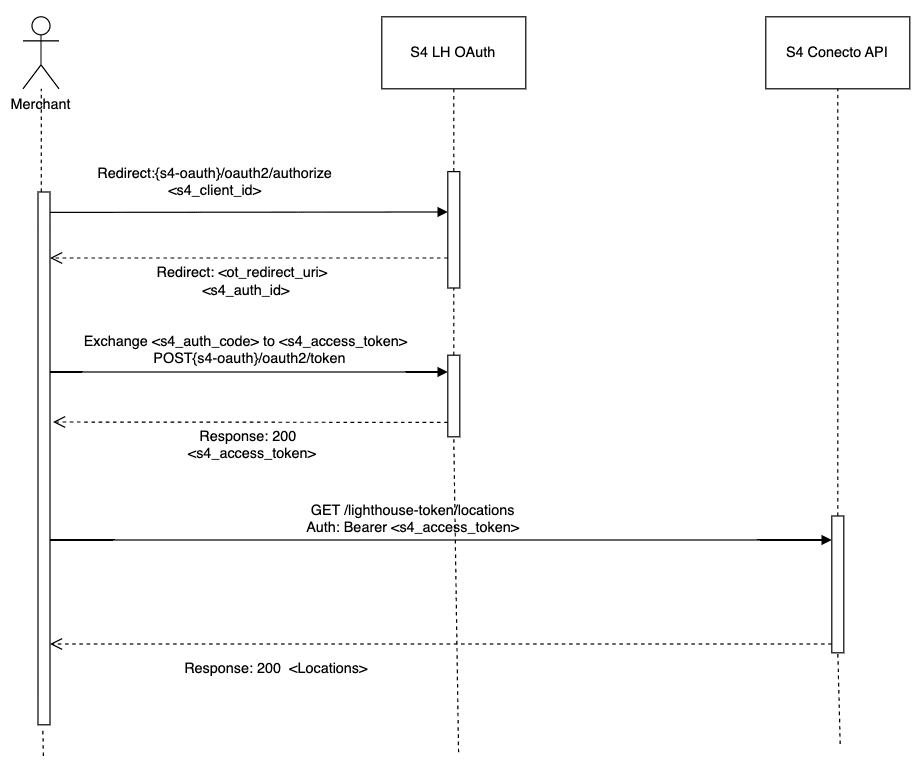
- The merchant initiates a request to S4 LH Auth, providing its client ID, in order to obtain an authorization code.
- Upon receiving the request, LH Auth redirects the merchant back to the specified redirect URI, appending a code query parameter containing the authorization code.
- The merchant, having received the authorization code, proceeds to exchange it with S4 LH Auth in order to acquire an access token.
- S4 LH Auth responds to the merchant's request by providing an access token, which can be used for subsequent API calls.
- Using the obtained access token, the merchant makes a request to the Conecto API, specifically asking for a list of LH User Locations.
- The Conecto API processes the request and returns a response containing the requested list of User Locations.
Activate Location Flow
The diagram below presents a simplified activate Location Request Flow sequence:
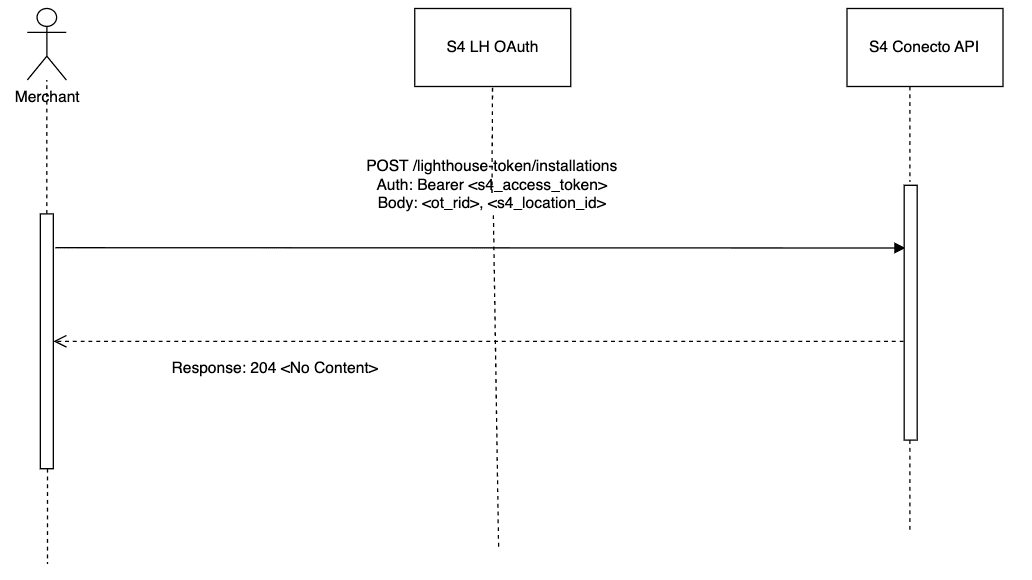
- The Merchant sends a request to the S4 Conecto API, requesting the installation of an integration for a specific location. The request includes the LH User Access Token, which serves as an authorization credential.
- Upon receiving the request, the S4 LH OAuth validates the provided Access token in the middleware of the Conecto API. This validation process ensures that the token is valid and authorized to access the requested resources.
- After successful validation, the Conecto API proceeds to install the integration for the requested location. Once the installation is completed, the API sends a response with a status code of 204, indicating a successful operation without any content in the response body.
Authorization Process
Step 1: Initiate OAuth Flow
Direct merchants to the authorization endpoint with required parameters:
https://lighthouse-api.harbortouch.com/oauth2/authorize/?client_id=YOUR_CLIENT_ID&redirect_uri=https://yourapp.com/callback&response_type=code
Required Parameters:
| Parameter | Description |
|---|---|
client_id | Your application's Client ID (provided by Shift4) |
redirect_uri | Your registered callback URL |
response_type | Always set to code for authorization code flow |
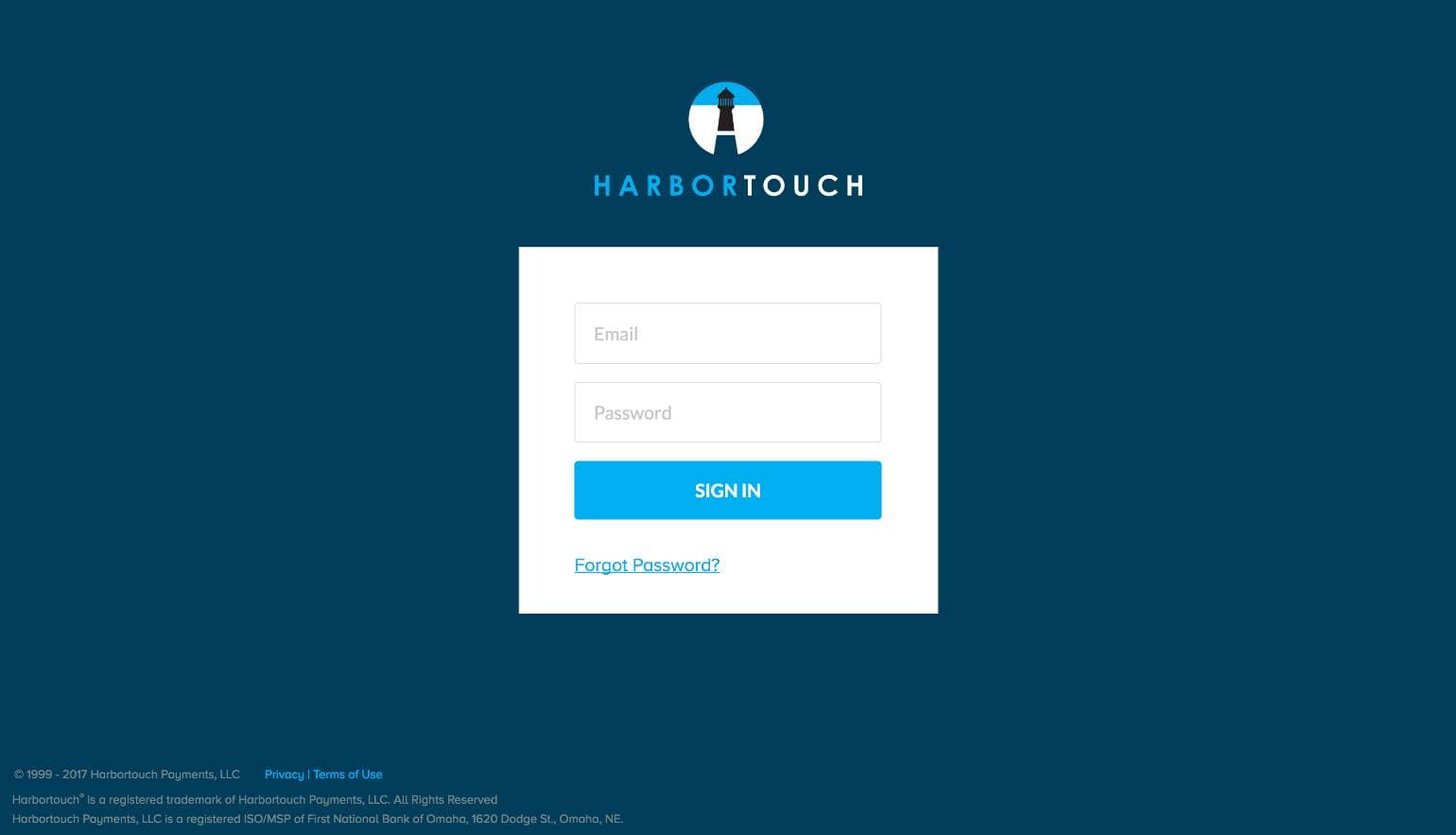
At this URL, the Merchant will see a login screen:
The permissions form is displayed when the Merchant signs in to Lighthouse:
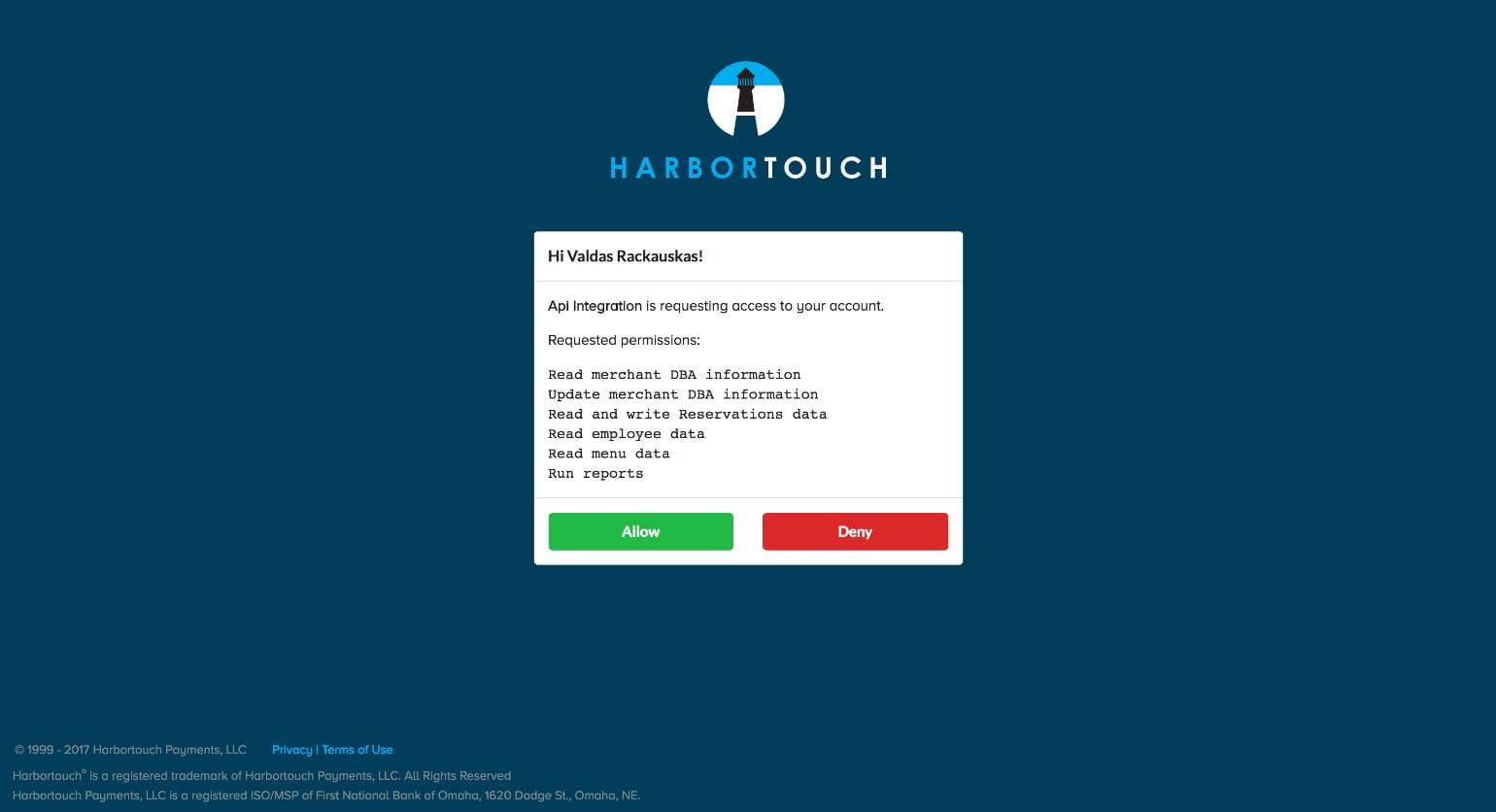
The permissions form shows which permissions the application is requesting. If the merchant is comfortable with the permissions listed, they click Allow. Otherwise, they click Deny. In either case, the merchant will be redirected back to your provided redirect_uri.
Step 2: Handle Authorization Response
Success - Merchant Approves Access
When a merchant approves, they're redirected to your callback URL with an authorization code:
https://yourapp.com/callback?code=AUTHORIZATION_CODE
Exchange this code for access and refresh tokens:
Method: POST
Endpoint: /oauth2/token/
Content-Type: application/json
Exchange the authorization code for access and refresh tokens.
Request
curl -X POST https://lighthouse-api.harbortouch.com/oauth2/token/ \
  -H "Content-Type: application/json" \
  -d '{
    "grant_type": "authorization_code",
    "code": "AUTHORIZATION_CODE",
    "redirect_uri": "https://yourapp.com/callback",
    "client_id": "YOUR_CLIENT_ID",
    "client_secret": "YOUR_CLIENT_SECRET"
  }'
Response
{
  "access_token": "eyJhbGciOiJIUzI1NiIsInR5cCI6IkpXVCJ9...",
  "refresh_token": "refresh_abc123xyz789...",
  "permissions": ["read:locations", "write:installations"],
  "expiration": 86400,
  "token_type": "Bearer"
}
Denial - Merchant Denies Access
If the merchant denies access, they're redirected with an error parameter:
https://yourapp.com/callback?error=access_denied
Handle this gracefully by displaying an appropriate message to the merchant.
Token Management
Access Token Usage
Include the access token in every API request header:
curl -X GET https://lighthouse-api.harbortouch.com/api/v1/locations/ \
  -H "Authorization: Bearer YOUR_ACCESS_TOKEN"
Token Details:
- Access tokens expire after 24 hours
- Token type is always
Bearer - Include in the
Authorizationheader for all API requests - Store securely (encrypted at rest)
Refresh Expired Tokens
When access tokens expire (indicated by a 401 Unauthorized response), use the refresh token to obtain a new access token:
Method: POST
Endpoint: /oauth2/token/
Content-Type: application/json
Exchange your refresh token for a new access token without requiring the merchant to re-authorize.
Request
curl -X POST https://lighthouse-api.harbortouch.com/oauth2/token/ \
  -H "Content-Type: application/json" \
  -d '{
    "grant_type": "refresh_token",
    "refresh_token": "USER_REFRESH_TOKEN",
    "client_id": "YOUR_CLIENT_ID",
    "client_secret": "YOUR_CLIENT_SECRET"
  }'
Response
{
  "access_token": "eyJhbGciOiJIUzI1NiIsInR5cCI6IkpXVCJ9...",
  "refresh_token": "refresh_abc123xyz789...",
  "permissions": ["read:locations", "write:installations"],
  "token_type": "Bearer"
}
API Endpoints
Retrieve Eligible Locations
Returns all locations where the merchant can install your integration.
Method: GET
Endpoint: /marketplace/v2/lighthouse-token/locations
Authentication: Bearer token required
Use this endpoint after obtaining an access token to display available locations to the merchant.
Request
curl -X GET https://conecto-api.shift4payments.com/marketplace/v2/lighthouse-token/locations \
  -H "Authorization: Bearer YOUR_ACCESS_TOKEN"
Response
{
  "results": [
    {
      "id": 12345,
      "name": "Downtown Restaurant",
      "timeZone": "America/New_York",
      "merchantId": "MERCH-12345",
      "countryCode": "US",
      "currency": "USD",
      "language": "en",
      "brandRef": "skytab",
      "address": {
        "street": "123 Main St",
        "city": "New York",
        "state": "NY",
        "zipCode": "10001"
      }
    }
  ],
  "meta": {}
}
Install Integration
Installs your integration for a specific location.
Method: POST
Endpoint: /marketplace/v2/lighthouse-token/installations
Authentication: Bearer token required
Content-Type: application/json
Submit installation for the selected location. The merchant must have granted appropriate permissions.
Request
curl -X POST https://conecto-api.shift4payments.com/marketplace/v2/lighthouse-token/installations \
  -H "Authorization: Bearer YOUR_ACCESS_TOKEN" \
  -H "Content-Type: application/json" \
  -d '{
    "locationId": 12345
  }'
Response
204 No Content
Best Practices
- Name
Secure Token Storage- Description
Store access and refresh tokens encrypted at rest in a secure database or vault. Never expose tokens in logs or client-side code.
- Name
Automatic Token Refresh- Description
Implement automatic token refresh before expiration. Monitor for 401 errors and refresh tokens immediately when detected.
- Name
HTTPS Only- Description
Always use HTTPS for OAuth endpoints and redirect URIs. Never use HTTP in production environments.
- Name
State Parameter- Description
Include a state parameter in authorization requests to prevent CSRF attacks. Validate the state on callback.
- Name
Error Handling- Description
Handle both approval and denial scenarios gracefully. Provide clear messaging to merchants about access requirements.
- Name
Redirect URI Validation- Description
Ensure your redirect URI exactly matches the URI registered with Shift4. Mismatches will cause authorization failures.
- Name
Cache Location Data- Description
Cache location data to reduce API calls. Refresh periodically or when webhooks indicate changes.
- Name
Exponential Backoff- Description
Implement exponential backoff for failed API requests to avoid overwhelming the API during outages.