Installation Request Flow
The Installation Request Flow describes how third-party integrations are installed through the Shift4 Marketplace using webhook notifications and API callbacks.
Overview
When merchants initiate installation through the Shift4 Marketplace, the system creates an installation request and notifies your integration via webhook. This flow provides comprehensive merchant data through a prefilled form and allows you to manage the installation process through state transitions.
Key Components
- Webhook Notifications - Receive real-time installation request events
- Installation Request API - Retrieve and update installation request details
- State Management - Track installation progress through defined states
- Merchant Data - Access comprehensive location and contact information
Flow Diagram
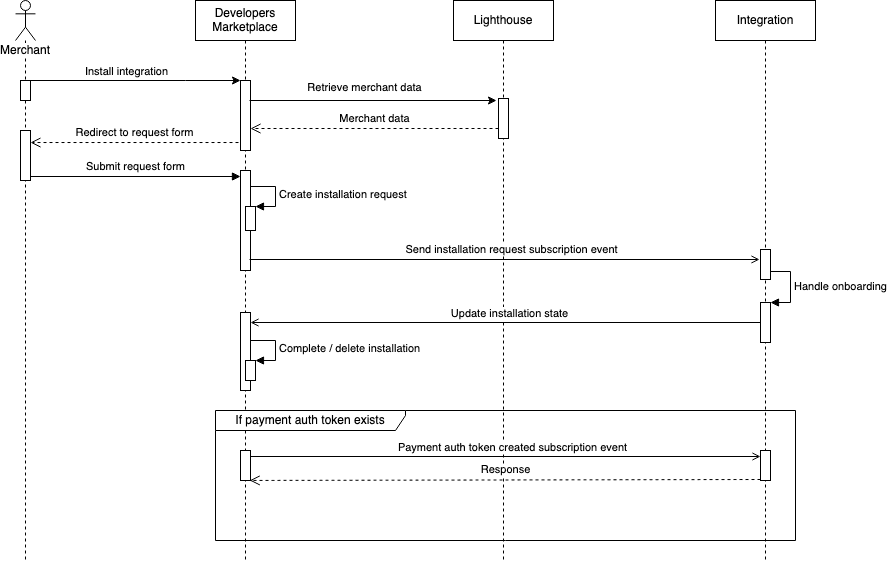
The image below presents a simplified Installation Request Flow sequence diagram:
Flow Steps
The installation process follows a seven-stage workflow:
1. Merchant Initiates Installation
Merchant clicks the install button for your integration in the Marketplace.
2. Form Redirect
Marketplace redirects to a prefilled request form with merchant data from Lighthouse.
3. Form Submission
Merchant reviews and submits the installation request form.
4. Webhook Notification
Your integration receives a marketplace.InstallationRequest.created webhook event with locationId and guid.
5. Retrieve & Process
Call GET /marketplace/v2/locations/{locationId}/requests/installations/{guid} to retrieve full installation details, then begin merchant onboarding.
6. Update State
Use PATCH endpoint to update installation state as you progress through onboarding (IN_PROGRESS → FULFILLED or REJECTED).
7. Completion
Marketplace completes the installation based on final state. Merchant receives email notification.
API Endpoints
Retrieve Installation Request
Returns comprehensive installation request data including location, restaurant, contact, and sales information.
Method: GET
Endpoint: /marketplace/v2/locations/{locationId}/requests/installations/{guid}
Authentication: Required
Path Parameters:
locationId(integer, required) - Location identifierguid(string, required) - Installation request unique identifier
Request
curl -X GET https://conecto-api.shift4payments.com/marketplace/v2/locations/12345/requests/installations/abc-123-guid \
  -H "Authorization: Bearer YOUR_ACCESS_TOKEN"
Response
{
  "state": "PENDING",
  "createdAt": "2025-01-15T10:30:00Z",
  "location": {
    "id": 12345,
    "name": "Downtown Restaurant",
    "timeZone": "America/New_York",
    "merchantId": "MERCH-12345",
    "countryCode": "US",
    "currency": "USD",
    "language": "en",
    "brandRef": "skytab"
  },
  "restaurant": {
    "name": "Downtown Restaurant",
    "email": "contact@downtown.com",
    "address": {
      "street": "123 Main St",
      "city": "New York",
      "state": "NY",
      "zipCode": "10001"
    },
    "integrationAccountStatus": "active"
  },
  "contact": {
    "firstName": "John",
    "lastName": "Doe",
    "email": "john@downtown.com",
    "phone": "555-0100"
  },
  "salesRepContact": {
    "firstName": "Jane",
    "lastName": "Smith",
    "phone": "555-0200",
    "email": "jane@shift4.com"
  },
  "dealerContact": {
    "company": "Restaurant Partners",
    "firstName": "Bob",
    "lastName": "Wilson",
    "phone": "555-0300",
    "email": "bob@partners.com"
  }
}
Update Installation Request
Updates the installation request state to track progress.
Method: PATCH
Endpoint: /marketplace/v2/locations/{locationId}/requests/installations/{guid}
Authentication: Required
Content-Type: application/json
Path Parameters:
locationId(integer, required) - Location identifierguid(string, required) - Installation request unique identifier
Update the state as you progress through merchant onboarding.
Request
curl -X PATCH https://conecto-api.shift4payments.com/marketplace/v2/locations/12345/requests/installations/abc-123-guid \
  -H "Authorization: Bearer YOUR_ACCESS_TOKEN" \
  -H "Content-Type: application/json" \
  -d '{
    "state": "FULFILLED"
  }'
Response
200 OK
Installation States
Installation requests progress through the following states:
| State | Description | When to Use |
|---|---|---|
PENDING | Initial state when request is created | Automatically set by system |
IN_PROGRESS | Installation is actively being processed | Update when you begin onboarding |
FULFILLED | Installation completed successfully | Set after successful merchant setup |
REJECTED | Installation was rejected | Use if prerequisites aren't met |
CANCELLED | Installation was cancelled | Set if merchant abandons process |
State Transition Best Practices
- Name
Update to IN_PROGRESS- Description
Change state to
IN_PROGRESSas soon as you begin processing the installation request to indicate activity.
- Name
Complete with FULFILLED- Description
Only set to
FULFILLEDafter successfully completing all onboarding steps and merchant account creation.
- Name
Use REJECTED Appropriately- Description
Set to
REJECTEDif the merchant doesn't meet prerequisites or validation fails. Include reason in internal logs.
- Name
Handle CANCELLED- Description
Use
CANCELLEDif the merchant explicitly abandons the installation process before completion.
- Name
Store GUID- Description
Always store the installation request
guidfor future reference and support purposes.
Webhook Integration
Listen for the marketplace.InstallationRequest.created webhook event to receive installation requests:
{
  "event": {
    "name": "marketplace.InstallationRequest.created",
    "component": "marketplace",
    "resource": "InstallationRequest",
    "action": "created",
    "version": "v1",
    "subscriptionId": 1,
    "dispatchedAt": "2019-10-15T17:00:00.000Z"
  },
  "payload": {
    "locationId": 1,
    "guid": "07a3a97e-6154-4e18-97a0-4b59cdd79007"
  }
}
See the Subscriptions documentation for complete webhook setup and HMAC signature verification.