Link Token Flow
The Link Token Flow enables third-party integrations to create custom onboarding experiences by providing merchant and location data immediately after installation initiation.
Overview
In order to increase the data cohesion between Shift4 Marketplace and the third-party integration, the Link Token flow is introduced as an improvement to its predecessor - Basic installation flow. By introducing several generic points of communication, the Link Token flow allows for better UX and faster system coordination by:
- Custom onboarding pages with pre-populated merchant and location data
- Immediate process control transfer to the third-party after installation
- Confirmation capability for successful merchant account setup
Key Objectives
- Build tailored onboarding experiences with merchant context
- Take control of the process immediately after installation initiation
- Finalize installation only after successful merchant setup
Flow Diagrams
System Components Flow
The image below presents a simplified Link Token Flow sequence diagram:
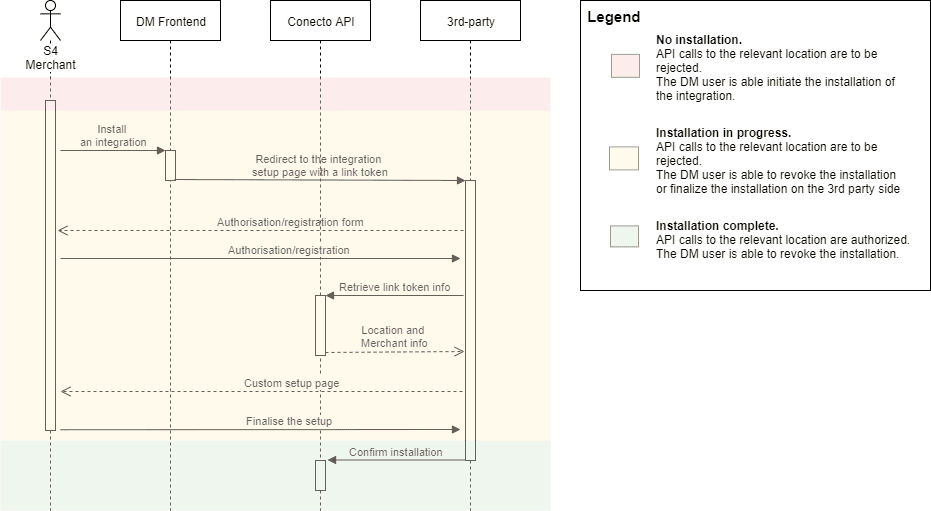
The Link Token flow involves at least three system components:
- Shift4 Marketplace Frontend application - an entry point for the Merchant to discover and install integrations
- Conecto API - the public API to extend the capabilities of a Merchant's POS
- 3rd-party system - a blackbox component representing the integration-oriented part of a 3rd-party system. Expected to include a User Interface to guide the Merchant and the capability to interact with Conecto API
The "setup" part of the installation is entirely according to the needs of a third-party. Shift4 Marketplace does not have any specific recommendations or expectations on what the Merchant will need to be prompted to do, besides the authorization/registration.
Merchant Journey
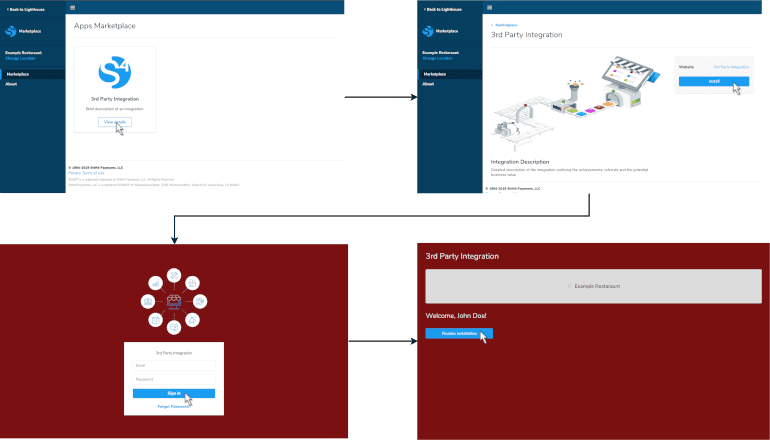
The image below presents an example of the Merchant traverse through the Link Token flow:
Installation URL
When setting up the integration in Shift4 Marketplace, we ask the third-party to provide an installation URL to redirect the Merchant to after the installation has been initiated. Your integration provides an installation URL to Shift4 during app registration. When merchants click "Install" in the Marketplace, they're redirected to your URL with a link token:
https://www.yourapp.com/shift4?linkToken=uuidhashstring
The third-party server is expected to parse the query parameter linkToken from the invoked URL. For example, after clicking "Install" in Shift4 Marketplace, the Merchant would be redirected to https://www.3rdparty.com/shift4?linkToken=uuidhashstring.
Important: Link tokens expire after 15 minutes. Implement appropriate error handling and user messaging for expired tokens.
System Architecture
Three components participate in the Link Token Flow:
- Shift4 Marketplace Frontend - Merchant discovery and installation entry point
- Conecto API - Public API for merchant data and installation finalization
- Your Integration - Custom UI and API interaction for merchant onboarding
API Endpoints
Retrieve Link Token Meta Information
Retrieves merchant and location information associated with a link token.
Method: GET
Endpoint: /marketplace/v2/links/{linkToken}
Authentication: Required
Path Parameters:
linkToken(string, required) - Link token from redirect URL
Returns comprehensive merchant data including user email, location details, sales representative information, and dealer contact details.
Request
curl -X GET https://conecto-api.shift4payments.com/marketplace/v2/links/abc123token \
  -H "Authorization: Bearer YOUR_ACCESS_TOKEN"
Response
{
  "user": {
    "email": "merchant@example.com"
  },
  "location": {
    "id": 12345,
    "name": "Downtown Restaurant",
    "timeZone": "America/New_York",
    "merchantId": "MERCH-12345",
    "countryCode": "US",
    "currency": "USD",
    "language": "en",
    "brandRef": "skytab"
  },
  "salesRepContact": {
    "firstName": "John",
    "lastName": "Smith",
    "phone": "555-0100",
    "phoneExt": "123",
    "email": "john.smith@shift4.com"
  },
  "dealerContact": {
    "company": "Restaurant Partners Inc",
    "firstName": "Jane",
    "lastName": "Doe",
    "phone": "555-0200",
    "phoneExt": "456",
    "email": "jane@restaurantpartners.com"
  }
}
Finalize App Installation
Completes the installation process after merchant onboarding.
Method: POST
Endpoint: /marketplace/v2/locations
Authentication: Required
Content-Type: application/json
Call this endpoint after successfully onboarding the merchant to finalize the installation in the Shift4 Marketplace.
Request
curl -X POST https://conecto-api.shift4payments.com/marketplace/v2/locations \
  -H "Authorization: Bearer YOUR_ACCESS_TOKEN" \
  -H "Content-Type: application/json" \
  -d '{
    "linkToken": "abc123token"
  }'
Response
201 Created
Merchant Workflow
The typical merchant journey through the Link Token Flow:
1. Merchant Initiates Installation
- Merchant browses the Shift4 Marketplace
- Clicks "Install" on your application
- Marketplace redirects to your installation URL with link token
2. Your Application Receives Redirect
- Extract link token from URL query parameters
- Validate token expiration (15 minutes)
- Call GET
/marketplace/v2/links/{linkToken}to retrieve merchant data
3. Custom Onboarding Experience
- Display custom onboarding flow using merchant information
- Collect any additional required information
- Create merchant account in your system
- Configure integration settings
4. Finalize Installation
- Call POST
/marketplace/v2/locationswith link token - Display success message to merchant
- Redirect merchant back to Shift4 or your application dashboard
Best Practices
- Name
Validate Immediately- Description
Call the link token endpoint as soon as the merchant arrives at your URL to ensure the token is valid and not expired.
- Name
Handle Expiration Gracefully- Description
Display clear error messages for expired tokens and provide instructions for re-initiating installation.
- Name
Store Securely- Description
Store merchant information securely in your database during onboarding, encrypted at rest.
- Name
Complete Promptly- Description
Finalize the installation as soon as merchant setup is complete to ensure proper tracking in the Marketplace.
- Name
Error Handling- Description
Implement comprehensive error handling for network failures, expired tokens, and API errors.