Payment Auth Token
Shift4 Marketplace helps third-party consumers retrieve payment authentication tokens after an app installation completes in a location. The third-party can exchange the auth token to an access token on their end via the i4go interface.
Terminology
Auth Token
Auth Tokens are issued for a specific merchant and third-party combination by the Lighthouse Transaction Manager (LTM).
Important characteristics:
- The token has an expiration
- The token can only be used once (when exchanging it to the i4go access token)
Access Token
Third-parties use merchant-specific "Access Tokens" to process merchant payments over the i4go gateway. The third-party obtains Access Tokens by exchanging Auth Tokens on their side.
Important characteristics:
- The token does not have an expiration
- The token can be revoked in LTM
- The token is related to third-party interface version and name
Access Token Exchange Flow
The following diagram illustrates how Auth Tokens are exchanged for Access Tokens:
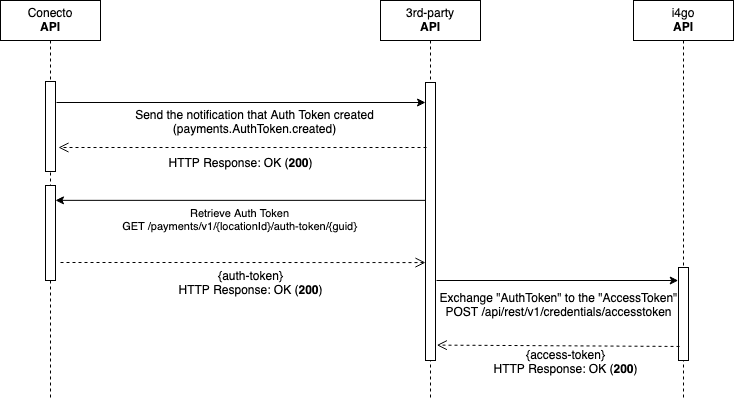
The exchange flow follows these steps:
- Subscription Event - Conecto API sends a subscription event after app installation completes
- Retrieve Auth Token - Third party consumer retrieves the Auth Token via API
- LTM Integration - Conecto API retrieves Auth Tokens from Lighthouse API
- Token Exchange - Third party consumer exchanges the Auth Token for an Access Token
After receiving a webhook notification, retrieve the Auth Token immediately as it expires and can only be used once.
Retrieve Auth Token
Retrieve a payment authentication token for a specific location and GUID. This token can be exchanged for an Access Token to process payments through the i4go gateway.
Path parameters
- Name
locationId- Type
- integer
- Description
The Lighthouse location identifier. Required.
- Name
guid- Type
- string
- Description
The unique identifier for the auth token (UUID format). Required.
Request
curl -X GET \
  'https://conecto-api.shift4payments.com/api/payments/v1/244/auth-tokens/d0511bae-1099-4ac1-bf48-1d8640575330' \
  -H 'x-access-key: YOUR_CLIENT_ID' \
  -H 'x-timestamp: 1709251200' \
  -H 'x-signature: YOUR_SIGNATURE'
Response
{
  "locationId": 244,
  "guid": "d0511bae-1099-4ac1-bf48-1d8640575330",
  "authToken": "eyJhbGciOiJIUzI1NiIsInR5cCI6IkpXVCJ9...",
  "expiresAt": "2024-03-15T12:00:00Z",
  "createdAt": "2024-03-15T10:00:00Z"
}
Auth Token Object
The Auth Token object contains the following properties:
- Name
locationId- Type
- integer
- Description
The Lighthouse location ID where the app was installed.
- Name
guid- Type
- string
- Description
Unique identifier for the auth token in UUID format.
- Name
authToken- Type
- string
- Description
The authentication token string to be exchanged for an Access Token.
- Name
expiresAt- Type
- string
- Description
ISO 8601 timestamp indicating when the auth token expires.
- Name
createdAt- Type
- string
- Description
ISO 8601 timestamp indicating when the auth token was created.
Best practices
Retrieve immediately after notification
When you receive a payments.AuthToken.created webhook event, retrieve the Auth Token immediately. Auth Tokens expire and can only be used once.
Exchange promptly
After retrieving an Auth Token, exchange it for an Access Token as soon as possible. Don't store Auth Tokens for later use.
Secure storage
Store Access Tokens securely using encryption at rest. Never expose Access Tokens in client-side code or logs.
Error handling
Implement proper error handling for expired or invalid Auth Tokens. If an Auth Token has expired, you'll need to wait for a new installation or re-installation event.
Token lifecycle
- Auth Token: Single-use, expires within hours
- Access Token: Long-lived, can be revoked but doesn't expire
- Always verify tokens haven't been revoked before processing payments